|
Getting your Trinity Audio player ready...
|
Why GitLab custom roles matter?
GitLab controls access through group and project membership. Users can have different roles in different namespaces, and those roles determine what they can do with repositories, issues, merge requests, pipelines, and settings.
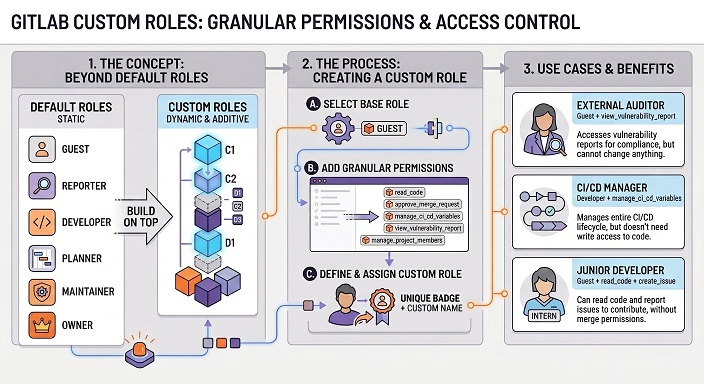
GitLab custom roles extend that model by letting teams start with a default base role and add only selected permissions.
For many teams, that solves a familiar problem.
A user may need to read code, manage a webhook, or administer a narrow setting without receiving the full breadth of Maintainer or Owner access.
Custom member roles are designed for exactly that kind of least-privilege delegation.
What GitLab custom roles actually are?
Custom roles are built on a base role
In GitLab, custom roles are an Ultimate feature. Each custom member role is based on a default role, and the base role defines the minimum access that user receives.
GitLab explicitly documents examples such as a Guest-based custom role that adds read_code so a user can view repository code without being promoted to a broader default role.
Custom roles are additive, not subtractive
This is the most important limitation to understand. GitLab custom roles can add permissions, but they cannot remove permissions that the base role already grants. So if a base role is already too broad, a custom role will not fix that.
The safest design pattern is to choose the lowest workable base role first, then add only the extra permissions that are truly needed.
Namespace design still matters
Custom roles do not replace good project structure. GitLab permissions are centered on GitLab resources such as groups, projects, repositories and settings.
That means the cleanest way to control who can access certain data is still to place sensitive data in the right groups and projects, then apply the right memberships and custom permissions inside those boundaries.
How GitLab custom roles affect API access?
The GitLab API follows the same authorization model
GitLab’s authorization guidance makes clear that permissions should be enforced consistently across shared business logic, REST API, GraphQL, and controllers.
In practical terms, that means the same permission model used in the web interface also influences what a user can read or change through API-backed actions.
That is why custom roles matter for API governance.
They do not act as a separate API firewall, but they do shape what an authenticated user is allowed to do inside GitLab, which in turn affects many API operations.
Which permissions matter most for API-driven access control?
GitLab exposes a catalog of predefined custom permissions.
Those include permissions such as:
read_codemanage_group_access_tokensmanage_project_access_tokensadmin_web_hook
All of which are relevant when you want tighter control over who can access data or manage integration points through GitLab.
This gives platform teams a practical way to delegate narrow capabilities.
For example, someone can be allowed to read repository code or manage project access tokens without being given a much broader default role just to unlock one operational task.
Why token scopes still matter?
Roles are only one layer of API access control
When API access is done through a token, GitLab also applies token scopes. GitLab documents scopes such as api, read_api, and read_repository, and those scopes define how broad the token itself is allowed to be.
A role can limit what the user is authorized to do, but the token scope still shapes what kind of API access is technically available.
That means strong GitLab API governance is always two-layered. First, give the user the narrowest membership and custom role needed. Second, give the automation or integration the narrowest token scope needed. Using only one of those layers is rarely enough.
Fine-grained tokens are better for endpoint-level control
If the goal is to restrict a token to a smaller set of REST API operations, GitLab documents fine-grained personal access tokens as a separate mechanism.
Those tokens are built specifically around defined REST API permissions and endpoint access, which is closer to a true “this token can call only these APIs” model than custom roles alone.
A key limitation for automation teams
GitLab also documents that tokens are not currently supported objects for custom roles. In other words, you can assign a custom member role to a user membership, but not directly to a token.
That is one reason token scopes and token type remain critical when you are trying to control data access through the GitLab API.
How GitLab custom roles help control webhooks?
Webhooks are a real data exposure point
Webhooks deserve special attention because they send events and metadata outside GitLab. If a user can create, edit, or delete a webhook, they can influence how project or group activity is shared with external systems. That makes webhook permissions a meaningful part of data access governance.
GitLab has a dedicated webhook permission
GitLab’s custom permissions catalog includes admin_web_hook, described as the permission to manage webhooks at group and project scope.
GitLab also documents this permission in the Member Roles API, which makes it a concrete control point for teams that want tighter governance over outbound integrations.
The practical nuance with webhook APIs
GitLab’s feature-specific webhook API docs still describe prerequisites using traditional roles. The project webhooks API says the caller must be an administrator or have the Maintainer or Owner role for the project, while the group webhooks API says the caller must be an Administrator or have the Owner role for the group.
That means custom roles clearly fit GitLab’s broader authorization model, but teams should still test webhook behavior on their GitLab version before relying on it as a hard production control. The permission exists and is documented, but feature-level docs still describe access in default-role language.
How to assign custom roles in GitLab?
Creation and assignment are both API-friendly
GitLab lets administrators or eligible group owners create member roles through the Member Roles API. GitLab also supports assigning a custom member role when adding or updating group or project memberships through member_role_id, which makes custom roles practical for onboarding automation and access workflows.
That matters for platform teams because access control does not need to stay manual. You can define standard custom roles for common personas, then apply them through your own provisioning flows instead of relying only on the web UI.
Watch a demo (7 min.): Implementing Custom Roles
Best practices for controlling access to data in GitLab
1. Start with structure
Keep sensitive assets separated into the right groups and projects. Good namespace design makes every later permission decision easier and safer because access boundaries are already clean.
2. Use the lowest workable base role
Because custom roles are additive, the base role matters a lot. Start low, then add only the permissions that serve a real operational need, such as read_code, manage_project_access_tokens, or admin_web_hook.
3. Pair custom roles with narrow token scopes
Do not treat custom roles as a complete API security model. Pair them with the smallest token scope that still works, and move to fine-grained tokens when endpoint-level control is important.
Final takeaway
GitLab custom roles are a strong least-privilege tool for controlling access to code, settings, token management, and webhook administration.
But the most accurate way to describe them is this: custom roles refine what a user can do inside GitLab, while token scopes and project or group boundaries determine how safely those permissions are exercised through the GitLab API and GitLab webhooks.
Teams that design around both layers will have a much stronger access-control model than teams that rely on default roles alone.
ALM Toolbox has assisted hundreds of clients in supporting GitLab, selecting the appropriate GitLab edition & license and in planning the product’s implementation and deployment.
We have been official partners of GitLab since 2016 and hold titles awarded by GitLab company:
Selected Partner, GitLab Hero and “GitLab Champion” as well as official professional GitLab certifications after passing qualification exams.
Recently, we were also selected by the research firm STKI as the “GitLab Selected Partner” for 2025.
You can contact us by email at gitlab@almtoolbox.com or call us:
866-503-1471 (USA / Canada) or +31 85 064 4633 (International)







