We’re happy to announce a new version of ClearCheck with a completely new reporting utility that allows ClearCase administrators to overview VOB’s health at a glance. ClearCheck monitors ClearCase VOBs and alerts on any issue or problem. The new version includes upgraded report and report customization. It also supports Windows 7 and secured communication.
What’s New?
a) Visual Reporting
- Enhanced visual presentation of results in a useful table
- Color-coded icons for quick review of the results: valid in green, warnings in yellow and errors in red.
- Advice is better positioned for clarity
- Summary of errors and warnings
- Option to show only errors and warnings in reports sent to the administrator’s email
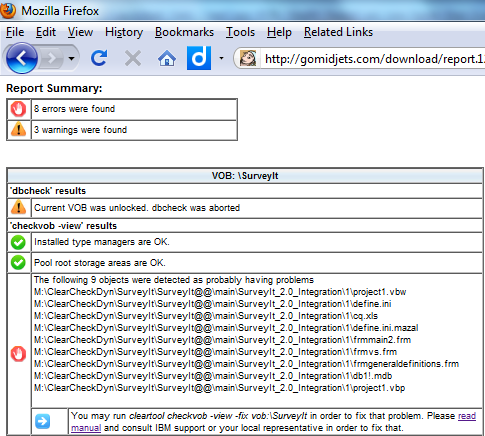
To watch a full report as it seen in your browser, click here.
b) Reporting options
- Presentable PDF reports that can be sent out to management or external consultants (watch an example).
- Customizable report header
- Option to send report as email with HTML or PDF attachment
c) Compatibility
- Supports Windows 7
- Supports SSH private\public keys authetication on Unix/ Linux servers
- Complies with SOX security requirements
- Better integration with Windows scheduler for easier daily reporting
- New dynamic varialbes for tight integration with backup systems
- Improved integration with ClearCase backups and (IBM, NetApp, HDS, Sun etc.)
What’s Next?
- To download a trial version, click here.
- To learn more about ClearCheck, visit https://www.almtoolbox.com/clearcheck