In this article we’ll explain what are Cosmos, Software Factory and how Cosmos helps reduce time from submiting a pull/merge request until it’s merged.
A pull request passes every CI check. Then someone tries the operation described in the ticket, and the bug is still there. That happened to Augment Code on a change to its chat API. The unit test exercised one endpoint. The client used another. The engineer reviewing the change found out because a Cosmos agent tried the operation against a running application.
Cosmos is a platform for coordinating AI agents across software development tasks.
Give it a well-defined ticket and it can investigate the code, prepare a fix, open a pull request, respond to review comments, and collect evidence for the person deciding whether to merge.
Augment Code developed Cosmos. In October 2026, Harness acquired it along with the Auggie CLI and Code Context Engine. Harness now calls it the Cosmos Software Factory Agent.
What is a Software Factory?
Think about how your team handles a bug. Someone reproduces it, finds the relevant code, writes a fix, adds a regression test, and opens a pull request. If CI fails, the author investigates. A reviewer checks whether the change solves the original problem.
A software factory makes that process repeatable. The team defines what starts the work, who or what performs each step, what counts as evidence, and where an engineer must approve the result.
Cosmos calls these repeatable workflows loops and its specialized agents Experts. Using Cosmos Advisor, a team can describe a loop, inspect the proposed Experts, triggers, and execution environment, and approve the setup. Your existing CI pipeline still runs the checks you configured. Cosmos can start earlier, when the issue arrives, and pick the work up again when a failed check or a reviewer’s question needs attention.
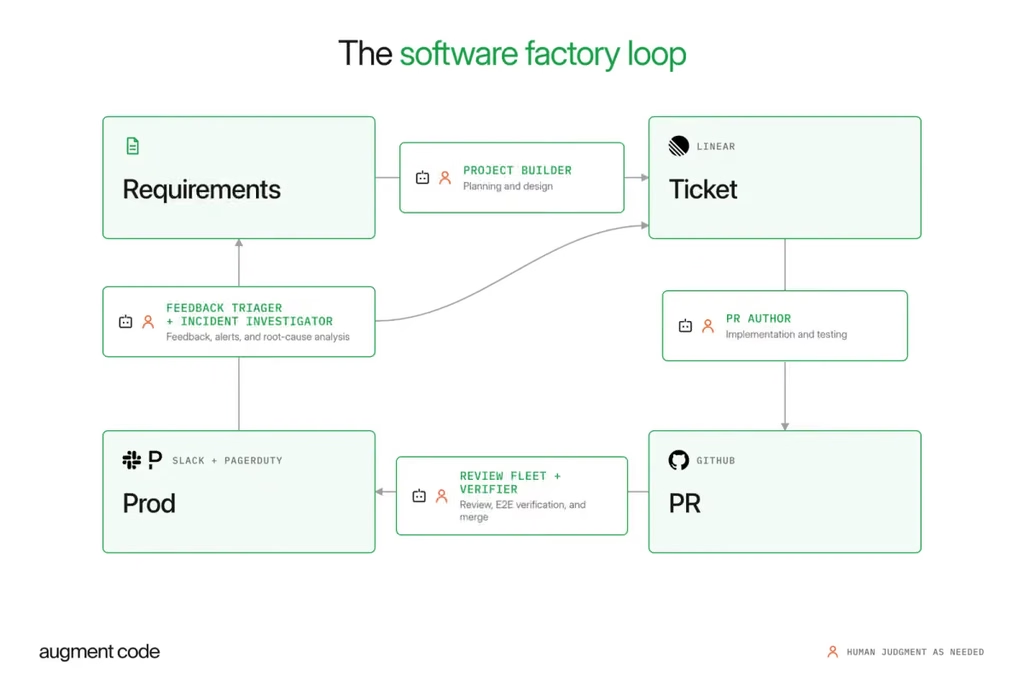
From ticket to tested pull request in Augment’s Cosmos software factory
(Image credit: Augment Code)
How does a ticket become a tested code change?
Let’s use the chat bug to illustrate a possible GitLab workflow. The ticket could say, “Messages sent through streaming chat are saved without the sender’s ID.” That gives the reviewer a concrete acceptance test. Send a message through the streaming endpoint, retrieve the saved message, and check the sender field.
1. The ticket triggers an investigation. A GitLab issue event can start a Cosmos session, or a developer can assign the task directly to the PR Author Expert. The Code Context Engine helps locate the client that sends the request, the handler that receives it, the storage code, and the tests across connected repositories. An engineer can review the proposed scope before implementation.
2. The PR Author prepares the change. It creates a branch, edits the implementation, adds a regression test, and opens a GitLab merge request or GitHub pull request. It runs commands in an environment configured with the project’s repositories and toolchain. Teams can use a cloud sandbox or run a daemon on their own machine when the build needs access to a private network.
3. Review and CI can send the author back to work. A Deep Reviewer examines the diff for correctness. If a test fails or a maintainer asks how older clients behave, the PR Author can investigate, update the branch, and respond on the request. A developer returning to the ticket can see the discussion, the revised code, and the latest checks together.
4. The Verifier tries the operation. Here’s what happened in Augment’s published example. The tests covered /chat, where the fix worked. The client called /chat-stream, which still lost the sender ID. The Verifier called that endpoint and confirmed that a different field in the same request reached storage correctly. The reviewer had a reproducible failure and a reason to send the patch back despite the green pipeline.
What are the benefits of Cosmos?
Cosmos addresses the waiting time between steps. A failed check can trigger follow-up while the original developer is working on something else. Shared instructions let several teams apply the same review practice. And the Verifier can attach logs, captured responses, or screenshots, so the reviewer can inspect what the agent actually tested and decide whether the evidence is sufficient.
Augment tracked 17,200 merged pull requests across its own engineering organization. As it expanded its use of agents, median time from opening a pull request to merging it fell from 11.2 hours to 3.1 hours. The models, adoption, and mix of work also changed during the study, so the figures describe Augment’s experience. For a pilot, we’d track that same time alongside how often an engineer has to redo the work.
Who uses Cosmos, and for what?
- Developers and tech leads can delegate well-scoped bug fixes, request a first review, or split a larger feature into tickets and coordinated pull requests.
- QA and test automation engineers can identify an untested user journey, define what success looks like, and have a Verifier exercise it in a test environment.
- Platform and DevOps teams can apply an approved migration plan across repositories. For a Java upgrade, each service owner can review a separate change and its test results.
- Application security teams can start from a dependency alert, identify affected repositories, and prepare patches for the service owners.
- Site reliability and on-call engineers can start an investigation from a PagerDuty alert. An Expert can assemble logs, recent changes, and a likely cause for the responder to examine.
For a first trial, we’d choose one repository and a recurring bug with a clear acceptance test.
If you’re looking at how AI agents could fit into your GitLab merge requests, GitHub pull requests or CI/CD pipelines, you can reach our team at gitlab@almtoolbox.com .
Watch Cosmos take a ticket to a pull request
Augment product lead Siyu Zhan demonstrates how her team takes customer feedback through to a pull request ready for engineering review: