|
Getting your Trinity Audio player ready...
|
In this article, I will provide a current overview of the various licensing and installation (deployment) options currently offered by GitLab (which we also offer as their official representatives in Israel and globally since 2016). We will also highlight some of the unique additional options we offer as supplements or alternatives.
Recently, there have been several changes to the options offered by the manufacturer, and GitLab version 18 has been released. This article includes all the latest updates.
It is important to note that the manufacturer may change the options from time to time. For the most current information and for any questions, you can contact us by email at gitlab@almtoolbox.com or call us:
866-503-1471 (USA / Canada) or +31 85 064 4633 (International)
A Brief Introduction: What is GitLab?
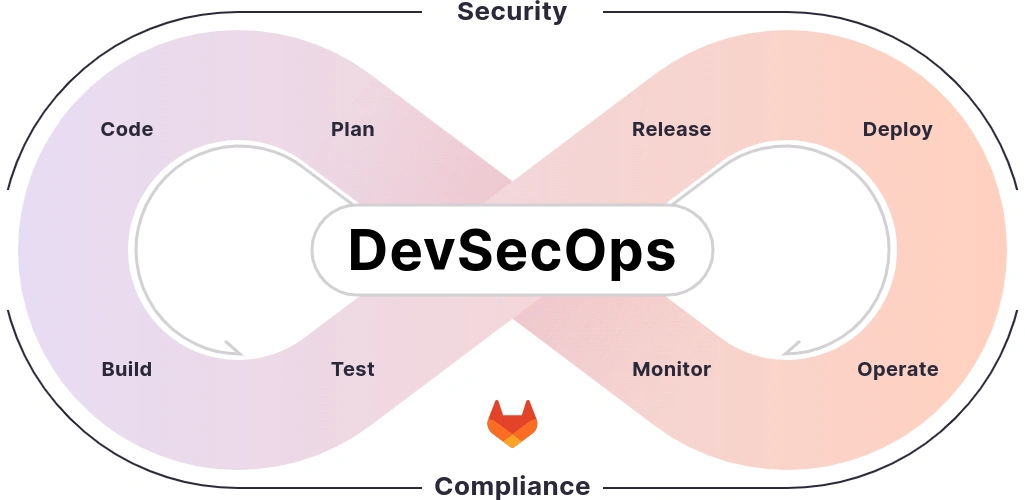
GitLab is a DevOps / DevSecOps platform that provides a complete development lifecycle – from the planning stage to deploying the solution in production, with an emphasis on Security, Compliance, and Gen AI capabilities.
This can be seen in the following diagram:
What are the Options for Using GitLab?
1. Cloud or On-Premises?
There are three main options here: Public Cloud (SaaS), Self-managed / On-premises, and Private Cloud (which is a hybrid of cloud and on-premises).
- Public Cloud (SaaS): This is a SaaS solution where you receive an instance as part of a public (shared) server with hundreds of other customers. You have no control over the installation method, its location, or when it will be upgraded or taken down for maintenance.
- Self-Managed (On-Premises): The server is yours, and you install the product yourself (there are several installation options, which we will detail later). You have complete control over the server.
- Private Cloud: This is essentially a private installation in the cloud. We offer this option as a managed service where we manage the server and environment for you (including hardening, installation, monitoring, ongoing maintenance, and more). This solution is considered the “best of both worlds” by many customers. It’s also possible for you to provide your own machine, and we will handle the rest.
You can read our detailed article on the differences between GitLab SaaS and Self-managed here.
There is also an option called “GitLab Dedicated” intended for customers with 1,000 or more users. It can only run on specific cloud providers and is available exclusively with the GitLab Ultimate edition. More information is available here.
Our GitLab Managed Service offers a similar, more flexible, and affordable service that is precisely tailored to the customer’s needs, including the option to have the data hosted in Israel. For more details, please contact us by email or phone (details below).
2. Which Edition Do You Want?
There are currently three editions available:
- a. Free / Community Edition: A free edition that includes a wide set of hundreds of features, with a focus on Version Control (SCM) and CI.
- b. Premium Edition: This edition includes everything in the Free edition, plus manufacturer support and a set of dozens of additional features in the areas of SCM, CI, Planning, and more.
With version 18.0, several AI capabilities (named “GitLab Duo Core“) were added to Premium:- Code Suggestions in IDEs (VS Code, Jetbrains, Visual Studio and GitLab Web IDE)
- Duo Chat in the IDE (VS Code, Jetbrains, Visual Studio, GitLab Web IDE and Eclipse)
- c. Ultimate Edition: This edition includes everything in the Premium edition, plus a set of dozens of additional features – including unlimited Guest users; Code Security and License Security capabilities; more Compliance features; Agile Planning, Epics, and Roadmaps; additional Dashboards and reports; and Value Stream Management and DORA capabilities.
All three editions are available for both public cloud and self-managed installations.
In the public cloud, the Free edition is limited to 5 users. On the other hand, you also get runtime for running CI on public runners at no extra cost (the amount of runtime is measured in minutes per month and varies by edition).
The commercial editions also include manufacturer support (quality support for the Free edition and as an add-on for commercial editions is available from us).
You can download our detailed comparative Excel table here with all GitLab features organized by edition, as well as our detailed article on the differences between the Premium and Ultimate editions.
3. Would You Like Add-ons?
There are currently three types of add-ons:
- a. AI Add-on: An AI add-on called GitLab Duo offers a set of 18 AI-based capabilities (including Code Suggestions, Chat, and more).
- This add-on is only accessible to users of the commercial editions (it cannot be used with the Free edition).
- The add-on requires an internet connection (meaning it cannot be used on a disconnected network).
- The add-on comes in two options and two licensing models: Duo Pro and Duo Enterprise. Code Suggestions and Chat are included in Duo Pro, while all other features are included in Duo Enterprise.
- Some features require a base user license to use the AI capabilities.
- You can contact us to get a trial to experiment with these capabilities, and we would be happy to answer any questions on the topic.
- You can read our detailed document explaining all the AI capabilities with examples here.
- b. Agile Planning Add-on:
The Enterprise Agile Planning add-on for Ultimate users offers a set of features for managing tasks and projects- The add-on is priced per user and can be purchased for a specific minimum number of users.
- You can read our article that expands on all the Agile Planning capabilities in GitLab here.
- c. Add-ons for Public Cloud (SaaS) Users: If you use GitLab’s public cloud, you have the option to add extra storage and additional CI runtime at a relatively low cost (the price is subject to change; please contact us for current pricing).
In this article, we have reviewed the different options for GitLab licensing editions and the various deployment options offered by the manufacturer.
Additionally, we offer complementary capabilities for the product, both through tools we have developed and can custom-develop for clients, and through complementary tools from other manufacturers (such as Jira, OpenProject, Terraform, Vault, Jenkins, Codeium, Copilot, and more).
Please feel free to contact us with any further questions; we will be happy to answer.
ALM Toolbox has assisted hundreds of clients in selecting the appropriate GitLab license and in planning the product’s implementation and deployment.
We have been official partners of GitLab since 2016 and hold titles awarded by GitLab company: “Selected Partner”, “Focus Partner”, “GitLab Hero” and “GitLab Champion” as well as official professional GitLab certifications after passing qualification exams.
Recently, we were also selected by the research firm STKI as the “GitLab Selected Partner” in Israel for 2025.
For questions or a request for pricing/quotes, you can contact us by email at gitlab@almtoolbox.com
or call us: 866-503-1471 (USA / Canada) or +31 85 064 4633 (International)
Interested in receiving an update when this article is revised in the future?
Send us an email at gitlab@almtoolbox.com with the subject line:
Gitlab-get-update-off-all-gitlab-offering







