|
Getting your Trinity Audio player ready...
|
Exploring Xray 8.4.0‑j9 for Jira Data Center: What’s new and why it matters
Xray 8.4.0‑j9 is the latest “Jira 9 release: New Features” build of Xray – Test Management for Jira,
now available for Jira Data Center 9.12.15–9.17.5.
As teams move toward Jira 9‑based environments and scale quality‑assurance workflows across large DevOps pipelines, this release brings important improvements in Jira 9.x compatibility, reporting performance, and Data Center‑specific stability.
For QA and DevOps leaders running Jira Data Center, understanding what’s new in Xray 8.4.0‑j9 is key to optimizing test‑management architecture, CI‑driven reporting, and traceability at scale. This post walks you through the major changes, how they impact your setup, and when it makes sense to upgrade.
Xray 8.4.0‑j9 lands on Jira Data Center
Xray 8.4.0‑j9 is the latest major release of Xray – Test Management for Jira, tailored specifically for Jira Data Center 9.12.15–9.17.5.
This version is positioned as a “Jira 9 release: New Features” build, which means it brings both platform‑compatibility updates and new capabilities for teams running large‑scale, clustered Jira environments.
For DevOps and QA architects who rely on Jira Data Center for mission‑critical workflows, this release is a good reason to revisit your test‑management setup and see how Xray 8.4.0‑j9 can improve traceability, reporting, and overall performance at scale.
Jira 9.x alignment and UI improvements
One of the core themes of Xray 8.4.0‑j9 is tighter integration with Jira 9.x.
The app now aligns better with Jira’s updated navigation, project sidebar, and shared UI components, so Xray‑driven items like Testing, Test Plans, Executions, and reports appear in the right sections and feel more “native” to users.
Key benefits for Data Center teams:
- Fewer UI inconsistencies when switching between Jira and Xray‑specific views.
- Smoother onboarding for testers who are used to the new Jira interface.
- Better alignment with Jira’s permission and global setting model at cluster level.
From a test‑management in Jira perspective, this makes Xray feel less like a “bolt‑on” add‑on and more like a first‑class citizen of the Jira 9 ecosystem.
New features in the “Jira 9 release: New Features”
Xray 8.4.0‑j9 is explicitly labeled as a “Jira 9 release: New Features” build, indicating that Xblend has added functionality on top of the Jira 9 platform rather than delivering only bug fixes.
Some of the valuable enhancements include:
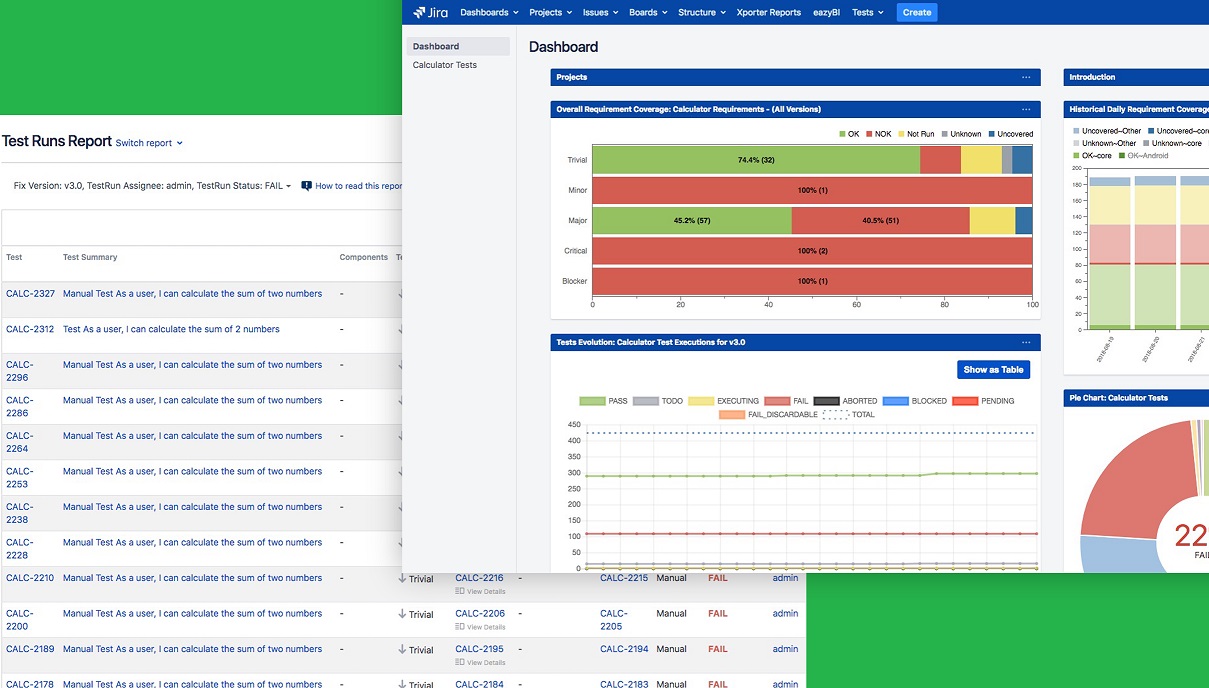
1) Improved reporting gadgets and dashboards
- Reporting gadgets and dashboards are optimized for Data Center clusters, especially when querying large test‑suite volumes or cross‑project coverage data.
- Users can expect faster loading of traceability views, coverage reports, and execution‑status gadgets, which is critical when executives or product owners want quick insights into quality metrics.
For teams using Xray for Jira in large‑scale environments, these improvements mean that dashboards stay performant even as you grow the number of test cases and projects.
2) Enhanced Testing Board and Test Plan views
- The Testing Board and Test Plan interfaces now provide smoother pagination, filtering, and sorting for large test sets and execution cycles.
- This is particularly useful for QA leads managing hundreds or thousands of test cases across multiple projects and teams, typical in enterprise DevOps environments.
From a test‑management in Jira 9 standpoint, these refinements make it easier to maintain test‑suite hygiene, plan regression cycles, and track execution progress without hitting UI bottlenecks.
3) Performance and stability for Jira Data Center
Because Xray 8.4.0‑j9 is built for Jira Data Center, performance and stability are front and center. The release includes several backend optimizations that directly impact how the app behaves in multi‑node environments:
- Reduced query latency when loading large Test Plans, Test Executions, and Traceability views.getxraydocs
- Improved stability for bulk operations, such as mass status changes, bulk result imports, and CI‑driven test runs, which are common in DevOps‑centric teams.marketplace.
- Fewer timeout and error conditions during high‑load scenarios, giving teams more predictable behavior during peak sprint or release periods.
For organizations running Jira Data Center‑based test management, these improvements matter when it comes to SLAs, reporting accuracy, and user satisfaction with the Xray for Jira experience.
Why this matters for DevOps and QA teams?
For DevOps and QA architects, Xray 8.4.0‑j9 is more than just a “we support Jira 9” update. It represents a step toward tighter integration between CI/CD pipelines, automated test execution, and Jira Data Center‑based traceability.
What you can optimize with this release:
- Rework or refresh Xray dashboards and gadgets to take advantage of the faster queries and refined reporting behavior.
- Review permission schemes and global settings to ensure they align with the new Jira 9.x patterns and your Data Center cluster topology.
- Coordinate with your QA leadership to adopt the improved Testing Board and Test Plan views, especially when managing large‑scale test‑suite maintenance or regression cycles.
From an Xray test management for Jira Data Center perspective, this release is a good opportunity to audit your current setup and ensure you’re getting the most out of the platform’s capabilities.
How to upgrade to Xray 8.4.0‑j9 ?
If your environment is running Jira Data Center 9.12.15–9.17.5, upgrading to Xray 8.4.0‑j9 is recommended. The upgrade path is straightforward for most Data Center clusters, but teams should:
- Back up Jira and Xray configuration (custom fields, dashboards, and reports) before upgrading.
- Schedule the upgrade during a maintenance window to avoid impacting real‑time test execution and CI pipelines.
- Validate key workflows (bulk imports, CI‑report ingestion, and reporting gadgets) after the upgrade to confirm performance and stability gains.
This upgrade is especially worth considering if you’re actively using Xray Jira 9 integrations and want to align your test‑management stack with the latest Jira 9.x capabilities.
At ALM Toolbox, we offer comprehensive upgrade consulting as part of our professional services suite. Feel free to reach out with any questions via the contact information below.
Wrapping up: Why Xray 8.4.0‑j9 matters for Jira Data Center teams
Xray 8.4.0‑j9 represents a solid step forward for test management on Jira Data Center, especially when you’re invested in Jira 9‑based deployments, large‑scale test suites, and CI‑driven quality gates.
By aligning tightly with Jira 9’s UI and platform behavior, while improving performance and stability in multi‑node environments, this release makes it easier to maintain clear requirements traceability, real‑time test‑coverage reporting, and smooth integration with automated pipelines.
If you’re running or planning a Jira‑based QA stack, upgrading to Xray 8.4.0‑j9 for Jira Data Center is a worthwhile move – one that can streamline how your teams plan, execute, and report on testing in large‑scale environments.
Whether you’re focused on Xray test‑management for Jira, Jira Data Center performance, or Xray for Jira 9 integrations, this release is a strong foundation for your next‑generation quality‑assurance architecture.
Note: This information is accurate as of the date of publication. Given the rapidly evolving nature of this technology, details may change over time.
With years of experience in Xray, Jira, and DevOps consulting, ALM Toolbox is dedicated to helping teams succeed. We also offer comprehensive Jira upgrade consulting through our professional services suite.
Have questions? Reach out to us today to learn more.
Contact us for any questions: jira@almtoolbox.com or call us:
866-503-1471 (USA & Canada) or +31 85 064 4633 (Europe)







