|
Getting your Trinity Audio player ready...
|
In light of questions we have received recently, I wrote this article to explain exactly what Docker Hub is.
Docker Hub: The Central Repository of the Container World
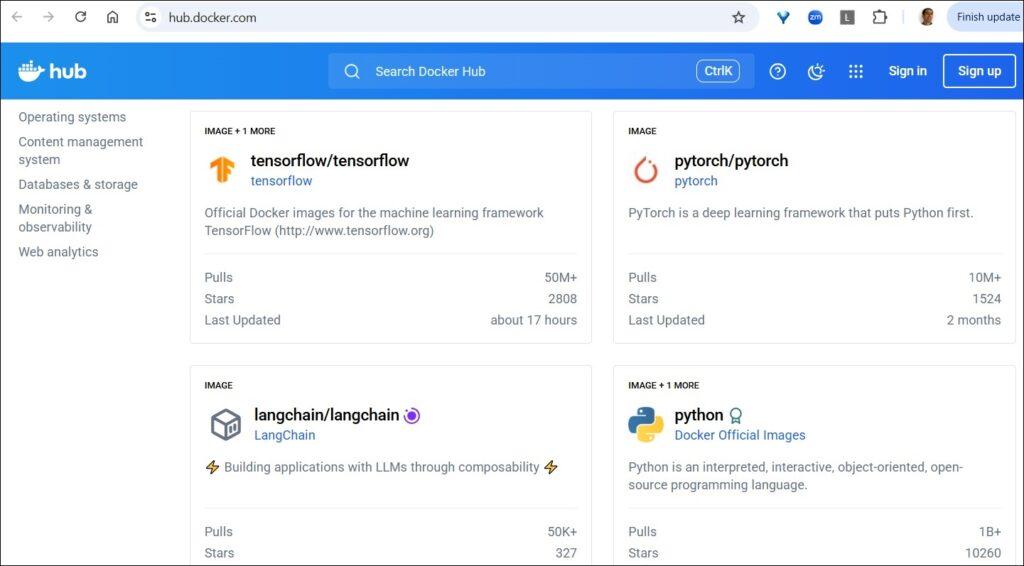
Imagine a world where every developer has to build absolutely everything themselves: the operating system, the libraries, and all application dependencies from scratch, for every single environment separately. Such a process would be incredibly slow, prone to errors, and would constantly generate the infamous problem: “But it works on my machine!”.
This is where Docker enters the picture, and this is where Docker Hub becomes a central and vital tool. If GitHub is the popular storage location today for managing application source code, Docker Hub is the most common storage location today for Docker Images, for sharing and managing the “building blocks” of modern applications.
Docker Hub is a cloud-based service (Container Registry) that constitutes the world’s largest public and official repository of container images.
You can think of it as an “App Store” (or “Google Play”) for servers, allowing development and DevOps teams to find, download, and distribute ready-to-use images with ease and speed.
The Hub forms a fundamental pillar in the containerization ecosystem and enables standardization and collaboration on a global scale.
What Makes Docker Hub Such a Vital Tool?
The power of Docker Hub lies in the variety of features it offers, which streamline the entire Software Development Life Cycle (SDLC):
- Public and Private Repositories: Similar to GitHub and GitLab, you can create Public repositories for the benefit of the open-source community, or Private repositories to store the company’s proprietary images. This allows full control over intellectual property and application security.
- Official Images: Docker Hub offers access to a vast library of Official Images, tested and approved by Docker and by leading software vendors (such as Ubuntu, Grafana, Python, NGINX, and MongoDB).
Using these images ensures a secure and stable starting point according to best practices. - Automated Builds: This is one of the strongest features for DevOps teams.
You can connect Docker Hub to code repositories like GitHub, GitLab, or Bitbucket, so that every push to a specific branch will automatically trigger a build process for a new image and push it to the repository.
This process is the core of Continuous Integration and ensures that the most up-to-date image is always available. - ⭐ New: Hardened, Secure, Minimal, and Production-Ready Images:
This is a new service called Docker Hardened Images (DHI), offering secure container images by default, which are “lean” and built specifically for Production environments and modern manufacturing environments. More information is available here. - Organizations & Teams: Administrators can create an Organization in Docker Hub, manage multiple teams under it, and assign precise and secure access permissions to the various repositories.
This capability is vital for managing work in an enterprise environment, for securing assets, and for efficient collaboration between teams.
What is the Practical Value for Managers and Dev Teams?
Beyond the technical features, Docker Hub provides significant business and operational value:
For Developers:
- Speed and Efficiency: There is no need to reinvent the wheel. Instead of installing a database or a web server manually, simply run docker pull and get a ready-to-use environment within seconds.
- Consistency Between Environments: It solves the “It works on my machine” problem. All team members, as well as testing and Production environments, use the exact same image, ensuring consistency and reducing compatibility issues and bugs.
For DevOps and Development Managers:
- Single Source of Truth: Docker Hub becomes the central and official repository for all organization images, facilitating version management, tracking, and security.
- CI/CD Optimization: Integration with automated build systems streamlines the entire development and release pipeline (Deployment Pipeline), shortens distribution times, and enables faster response to changes.
- Security and Control: The ability to use private repositories, manage permissions at the team level, and rely on official and scanned images significantly reduces security risks.
For CISOs and Security Teams:
For them, Docker Hub is not just a development tool, but a critical control point in Software Supply Chain Security.
The platform provides built-in capabilities for Vulnerability Scanning that identify known weaknesses and exposures (CVEs) in the operating system layers and software libraries included in the image.
This gives security teams full visibility into the risk level even before the container reaches the production environment.
Furthermore, using a central repository enables Policy Enforcement and Governance:
You can define which base images are approved for use in the organization, mandate the use of official images that have undergone security checks, and manage precise access permissions to prevent the pushing of unauthorized images.
In this way, Docker Hub transforms from a tool for rapid development into a strategic component in the defense array, enabling the reduction of the attack surface for container-based applications.
In Summary:
Docker Hub is much more than just a file repository. It is a vital platform that enables automation, collaboration, and standardization in the modern development world.
Its correct adoption allows organizations to build more reliable software, deliver faster, and remain competitive in a technological environment that changes ceaselessly.







