|
Getting your Trinity Audio player ready...
|
Learn how to reduce AI spending with LiteLLM using virtual keys, per-user budgets, team and organization limits, tags, rate limits, spend tracking, alerts, model fallbacks, automatic routing, prompt caching, and AI cost governance.
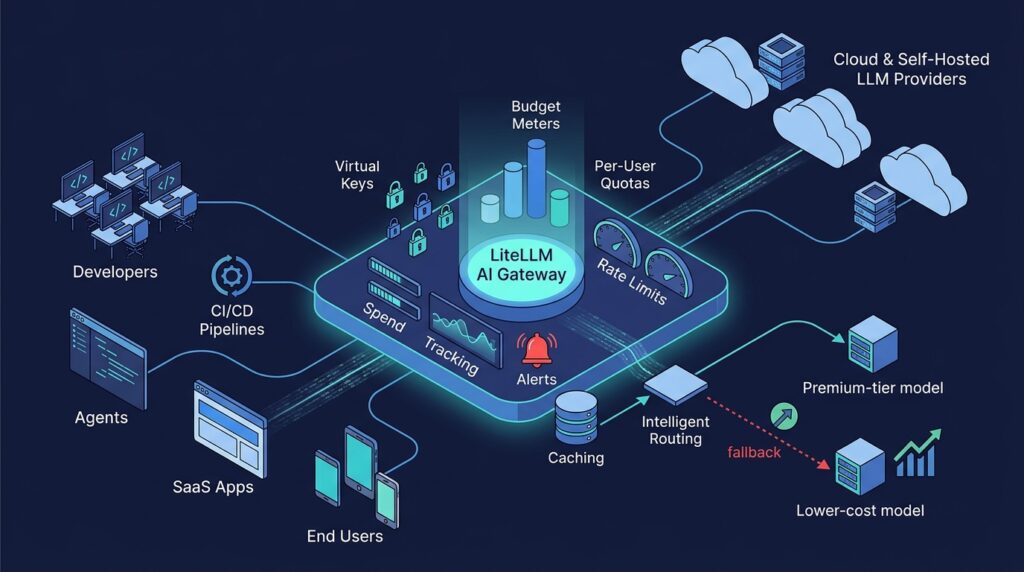
AI applications can become expensive very quickly. A developer agent, AI code-review bot, customer-support assistant, RAG service, CI/CD job, or retry loop can create high LLM spending long before a team notices the provider invoice. LiteLLM helps solve this problem by acting as a centralized AI gateway for cost control, usage governance, model routing, and spend visibility.
Instead of allowing each application, developer, or customer to call OpenAI, Anthropic, Azure OpenAI, Amazon Bedrock, Google Vertex AI, or self-hosted models directly, organizations can route AI traffic through LiteLLM. The proxy creates a single policy and observability layer for LLM budgets, rate limits, model access, end-user quotas, fallback routing, and cost attribution.
This guide explains how to use LiteLLM budget controls to reduce AI and LLM costs while maintaining service quality, developer productivity, customer access, and enterprise governance.
What Is LiteLLM?
LiteLLM is an LLM gateway and proxy that provides a unified, OpenAI-compatible API for multiple AI model providers. Applications can send requests to LiteLLM rather than maintaining separate integrations for each provider and model.
For enterprise platform engineering teams, LiteLLM is more than an API compatibility layer. It can become the central control point for AI usage across applications, CI/CD pipelines, developer tools, autonomous agents, internal chat systems, RAG platforms, and customer-facing SaaS features.
LiteLLM helps organizations:
- Track LLM spending by organization, team, user, virtual API key, customer, project, tag, endpoint, model, and provider.
- Set hard AI budgets and soft-budget warning thresholds.
- Control AI usage per individual end user or SaaS customer.
- Apply request-per-minute and token-per-minute limits.
- Restrict access to premium or unapproved AI models.
- Route requests to lower-cost models when appropriate.
- Configure budget fallbacks to preserve service after a premium model budget is exhausted.
- Implement AI showback and chargeback across teams, products, repositories, features, and customers.
- Keep provider API keys out of source code, developer laptops, CI/CD variables, and distributed application configuration.
- Operate a self-hosted AI gateway for enterprise, regulated, or air-gapped environments.
For DevOps, DevSecOps, and platform engineering teams, this turns AI consumption from a set of unmanaged provider credentials into a governed platform service.
Why AI Budget Control Matters
The financial risk of AI is not limited to premium models. The bigger issue is uncontrolled scale. A single request may cost little, but an AI workflow can produce substantial spend when it uses large prompts, long context windows, repeated tool calls, retries, parallel jobs, or large numbers of customers.
Typical AI cost drivers include:
- Large source-code, log, document, or knowledge-base prompts.
- Long context windows and oversized RAG retrieval results.
- Multi-step agent loops and tool-calling workflows.
- Automatic retries after provider or network failures.
- Parallel CI/CD jobs and repository-wide AI analysis.
- High-volume customer-facing chat or document-processing features.
- Premium models used by default for simple classification, extraction, or summarization tasks.
- Shared provider API keys with no per-user, per-team, or per-application accountability.
A simplified LLM cost model is:
Estimated LLM cost =
input token cost +
output token cost +
cached token cost +
tool or provider-specific cost
The important operational question is not only, “How much does one request cost?” It is: who is allowed to spend, how much can they spend, which models can they use, and what happens after a limit is reached?
LiteLLM provides a centralized policy layer for answering those questions consistently across AI applications and teams.
LiteLLM Budget Management Capabilities
LiteLLM supports several layers of AI cost control. The most effective deployment combines these layers rather than depending on a single global budget.
| LiteLLM control | Purpose | Example |
|---|---|---|
| Organization budget | Controls total AI platform spending | Maximum $20,000 per month for all LLM usage |
| Team budget | Limits product-team, department, or cost-center usage | Engineering team limited to $5,000 per month |
| User budget | Limits personal experimentation or internal AI usage | Developer sandbox limited to $20 per month |
| Virtual-key budget | Limits a specific application, agent, or pipeline | PR-review bot limited to $100 per month |
| Customer budget | Limits SaaS-tenant or customer consumption | Free customer limited to $2 in AI usage |
| Tag budget | Limits a project, feature, environment, or cost center | feature:ai-code-review limited to $1,000 monthly |
| Model budget | Limits premium-model consumption | Frontier model capped at $50 per day |
| Rate limit | Limits how quickly requests consume budget | 20 RPM and 100,000 TPM per CI key |
| Budget fallback | Preserves service while reducing cost | Premium model falls back to an approved lower-cost model |
LiteLLM can attribute spend across the organization, team, user, and virtual-key hierarchy. A request can be rejected when any relevant budget is exceeded. This is essential for a shared AI gateway because a team should not be able to bypass organization-wide cost limits by creating more API keys.
Control AI Usage Per End User
LiteLLM helps control AI usage at the individual end-user level. This is important for internal AI portals, developer assistants, customer-facing SaaS features, shared chat applications, and multi-tenant RAG platforms. An application can identify the requesting user or customer on every request, allowing LiteLLM to attribute requests, tokens, and spending to that specific identity.
Platform teams can apply per-user budgets, request-per-minute limits, token-per-minute limits, model-access restrictions, and user-level usage reporting. For example, a free SaaS user can be limited to $2 of AI use per month and a fixed token allowance, while a paid user receives a larger allowance and access to higher-capability models.
Per-user controls prevent a small number of heavy users from exhausting a shared budget. They also support product-plan entitlements, customer billing, internal chargeback, and clear support communication when a user reaches their AI allowance.
Per-user limits should be combined with customer, team, and organization budgets. This layered approach prevents individual controls from becoming a way to bypass a shared spending ceiling.
Use Virtual Keys Instead of Provider Keys
The first rule for controlling AI spend is simple: do not distribute provider master keys directly to applications, users, agents, developers, or CI/CD pipelines. Instead, issue LiteLLM virtual keys.
Each virtual key should represent a controlled workload, such as:
gitlab-pr-reviewer-prod
jenkins-security-analysis
developer-sandbox-john
customer-support-chatbot
rag-contract-summarizer
n8n-ai-ticket-triage
Each key can receive its own budget, model permissions, team assignment, user association, rate limits, tags, and expiration policy.
Example: Budget for a CI code-review agent
key_name: gitlab-pr-reviewer-prod
max_budget: 250
budget_duration: 30d
This policy limits the AI code-review agent to $250 over 30 days. If a pipeline configuration error causes the bot to analyze every branch repeatedly, LiteLLM prevents the workload from consuming unlimited provider credits. Once the budget is reached, the gateway rejects further requests or follows an explicitly configured fallback policy.
For production services, use both a long budget period and a short safety window:
Daily budget: $20
Monthly budget: $250
A daily cap limits immediate financial damage. A monthly cap protects the overall allocation and makes cost forecasting more predictable.
Apply Hierarchical AI Budgets
Virtual-key budgets are necessary, but they are not sufficient in multi-team organizations. A team can operate many applications, agents, pipelines, and developer tools. If every key has an independent budget, total team spend can still exceed the intended allocation.
Organization
  └── Platform Engineering Team
        └── AI Code Review Service
              └── Production Virtual Key
For example:
Organization budget: $30,000/month
Platform Engineering budget: $6,000/month
AI Code Review budget: $1,500/month
Production PR-review key: $400/month
A request must comply with every applicable limit. This structure ensures that an individual developer cannot exceed a sandbox allowance, a single service cannot consume the full team budget, and a team cannot consume the entire company AI allocation.
Hierarchical budgets also limit the financial blast radius of a leaked key, misconfigured application, runaway AI agent, or unexpected traffic spike.
Tag AI Requests for Chargeback and Showback
Tags are one of the most valuable LiteLLM capabilities for AI governance, chargeback, and showback. A budget answers, “How much can this identity spend?” Tags answer, “What business purpose is this cost associated with?”
Useful tags include:
environment:production
environment:staging
team:platform-engineering
project:gitlab-integration
repository:backend-api
feature:ai-code-review
customer:enterprise-acme
agent:security-triage
cost-center:r-and-d
Tags allow organizations to monitor and enforce AI spending by cost center, project, department, repository, customer, feature, environment, or workload category.
Example: Controlling an AI product feature
Tag: feature:document-summarization
Monthly budget: $3,000
Applied to: all production API keys used by this feature
This configuration gives product management and finance a direct view of the AI cost of a specific feature. When spending approaches the limit, the team can optimize prompts, introduce caching, change the model route, reduce free-tier access, or formally raise the approved feature budget.
For reliable attribution, bind required tags to virtual keys rather than trusting callers to submit tags dynamically. Every request made through the key then inherits the required tag and its policy.
Use Soft Budgets and Spending Alerts
A hard budget cap protects against overspending, but it can also create an application outage if it is reached unexpectedly. Soft budgets and budget alerts give teams time to respond before a critical key becomes unusable.
| Budget usage | Recommended response |
|---|---|
| 50% | Review spending and confirm whether usage growth is expected. |
| 80% | Create a task for the service owner; review routing, token usage, retries, caching, and traffic growth. |
| 95% | Escalate to the platform or on-call team for production services. |
| 100% | Block the request or use an explicitly approved fallback model. |
For customer-facing systems, alerts provide time to respond before customers experience an AI-feature outage. For internal experimentation, a hard stop at the budget limit is often the safest and simplest policy.
Control Premium Model Spend
Not every AI task requires the most expensive model. Many organizations increase their AI bill because developers select premium models by default for routine work such as ticket classification, language detection, metadata extraction, summarization, log normalization, release-note formatting, FAQ responses, and low-risk code documentation.
LiteLLM can restrict which models teams and virtual keys can access. A platform team can expose curated model groups rather than an unrestricted list of provider-specific model names.
Example: Approved model tiers
standard-chat
  - lower-cost general-purpose chat model
  - standard production chat model

coding
  - approved standard coding model
  - approved premium coding model

restricted-reasoning
  - premium reasoning model
  - available only to selected teams or production workflows
This model-governance approach controls which workloads can invoke high-cost models. It also makes future model and provider migration easier because applications can call an internal logical model name while LiteLLM performs the routing.
Use Budget Fallbacks to Preserve Service
A hard budget limit often returns a budget_exceeded error. For non-critical jobs, that is usually the correct outcome. For customer-facing applications, developer assistants, or continuous automation, a complete outage may be worse than a temporary reduction in model quality.
Budget fallbacks allow LiteLLM to cap spending on a specific model and route a request to a configured fallback model after the cap is reached.
Example: AI coding-assistant fallback chain
Primary model: premium coding model
Premium-model budget: $50/day

Fallback 1: standard coding model
Fallback 2: low-cost coding model
Final behavior: reject requests
This policy lets developers use the best approved model while the budget is available. Once the daily premium-model allocation is exhausted, LiteLLM continues serving requests through a lower-cost approved model.
This approach is useful for AI code review, pull-request summaries, test generation, ticket enrichment, internal support bots, release-note drafting, batch document classification, and general developer chat.
Do not silently downgrade models in workflows where lower quality could create a security, regulatory, safety, financial, or correctness issue. In these cases, a hard stop and human-review process may be safer.
Prevent Runaway Spend with Rate Limits
Budgets limit total spending over time. Rate limits control how fast a service can spend. A monthly $1,000 budget is not enough protection if a CI job can send thousands of requests in a few minutes; it can still burn the full allocation almost immediately.
Use request-per-minute (RPM) and token-per-minute (TPM) limits to protect against:
- Infinite retry loops.
- Autonomous agent loops.
- Parallel CI/CD pipeline fan-out.
- API-key abuse or a leaked credential.
- Sudden customer-traffic spikes.
- Unbounded batch jobs.
- Full repository or document-corpus resubmission.
- Large prompt growth caused by a configuration bug.
Example: Secure an LLM-enabled pipeline
Virtual key: jenkins-security-analysis

Monthly budget: $500
Daily budget: $40
Request limit: controlled RPM
Token limit: controlled TPM
Model access: approved security and coding models only
Fallback: lower-cost analysis model for low-risk jobs
Tags: pipeline, repository, branch, environment, cost-center
This gives a DevSecOps team visibility into AI-analysis cost per repository, pipeline type, and branch category. It also limits the impact of a misconfigured pipeline or a malicious pull request designed to trigger expensive AI analysis.
Track Customer and Tenant AI Usage
For SaaS platforms, customer-level tracking is essential. If all users share one AI budget, a small number of high-volume customers can consume the entire allocation. LiteLLM can track customer usage, budgets, rate limits, usage logs, and activity metrics when customer identifiers are included in requests.
| Customer plan | Monthly AI allowance | Policy after limit |
|---|---|---|
| Free | $2 | Block requests or offer an upgrade. |
| Pro | $25 | Send a soft warning, then limit requests. |
| Business | $100 | Fall back to a standard model or charge overage. |
| Enterprise | Contractual | Apply a custom budget, model access policy, and reporting arrangement. |
This turns AI consumption into a controlled product entitlement rather than an unbounded shared cost. It also enables showback and chargeback by allowing finance and customer-success teams to compare tenant AI cost with subscription revenue.
Best Practices for Configuring LiteLLM to Save AI Spend
The most effective LiteLLM cost-saving configuration combines prevention, efficient model selection, and continuous measurement.
Start by routing all AI traffic through the proxy and issuing separate virtual keys for each application, CI/CD job, agent, environment, and customer tier.
Apply both short and long budget windows – for example, a daily cap to stop a runaway workload quickly and a monthly cap to protect the overall allocation.
Restrict expensive models to workloads that demonstrably need them, expose approved logical model groups rather than raw provider models, and configure a safe fallback chain from a premium model to a standard or lower-cost model where reduced quality is acceptable.
Enable provider prompt caching and semantic or response caching for repetitive workloads, but enforce tenant isolation and data-classification rules before caching sensitive prompts. Use auto-routing only after evaluating it against representative production prompts, and monitor both quality and savings.
Finally, keep the model cost map current – including negotiated provider discounts and self-hosted inference prices – because incorrect pricing weakens budget enforcement, chargeback, forecasting, and model-routing decisions.
- Use one virtual key per workload, environment, customer tier, CI job, or agent instead of sharing a provider credential.
- Stack a short budget window, such as daily, with a longer monthly or quarterly allocation.
- Set soft-budget alerts at meaningful thresholds such as 50%, 80%, and 95%, then use a hard stop at 100%.
- Apply RPM and TPM limits so a retry loop, agent loop, or CI/CD fan-out cannot consume an entire budget in minutes.
- Use model-access groups to prevent routine workloads from selecting premium models by default.
- Configure model-specific budgets and fallback chains for non-critical workloads that can safely use a lower-cost model.
- Enable provider prompt caching where supported, and use semantic caching only after validating response correctness, privacy, and tenant isolation.
- Evaluate auto-routing with representative prompts and quality checks; do not measure savings without monitoring task-completion quality.
- Attach tags to virtual keys for cost-center, project, feature, repository, tenant, and environment attribution.
- Maintain an accurate model cost map, including regional pricing, enterprise discounts, and internal GPU or self-hosted inference costs.
- Monitor cache-hit rate, routing distribution, input and output token growth, retries, and cost per successfully completed task – not only raw request cost.
- Size Redis with sufficient headroom and avoid eviction, because LiteLLM uses it for rate-limit counters, routing state, cached responses, and queued spend updates.
Estimate Costs Before Production
Cost controls should start before deployment. Use LiteLLM pricing and model-cost capabilities to estimate expenditure from expected token usage and request volume before exposing a new AI feature, workflow, or agent to users.
| Scenario | Purpose |
|---|---|
| Expected usage | Standard product and traffic forecast. |
| High adoption | Measures successful-launch cost exposure. |
| Failure and retry scenario | Identifies unexpected cost from provider errors or repeated calls. |
| Agentic worst case | Estimates spending from long contexts and repeated tool loops. |
A low token price does not necessarily mean a low total cost. Evaluate the cost per successfully completed task. A lower-cost model might require retries, multiple calls, or human correction, while a more capable model may complete the task correctly in one pass.
Maintain Accurate Internal Cost Data
For custom, self-hosted, or privately negotiated deployments, maintain accurate internal model pricing. This is particularly important for self-hosted models, air-gapped AI deployments, vLLM, Ollama, SGLang, internal inference clusters, GPU-backed Kubernetes platforms, reserved cloud capacity, and discounted enterprise provider contracts.
For internal inference, decide what “cost” means in your organization:
- GPU infrastructure amortization.
- Reserved cloud capacity.
- Consumption-based cloud GPU pricing.
- Platform-team chargeback rate.
- Fixed project allocation.
- Marginal per-token cost.
Document the accounting model so product teams understand what their LLM usage represents financially. Accurate pricing improves model comparisons, budget enforcement, chargeback, and future AI investment decisions.
Reduce AI Costs with Caching
One of the most effective ways to reduce AI cost is to avoid duplicate model calls. LiteLLM supports caching capabilities, including semantic caching, which can reuse a previous answer for a sufficiently similar request.
Caching is especially valuable for internal knowledge-base questions, repeated FAQ requests, similar support requests, document summaries, template-based generation, repeated evaluations, static documentation questions, and common codebase questions.
Important security consideration
Caching improves cost efficiency, but cached prompts and completions must be treated as sensitive data. Before enabling caching for sensitive workloads:
- Review data-classification and privacy requirements.
- Avoid caching secrets, credentials, proprietary source code, or regulated data.
- Enforce tenant isolation.
- Restrict access to cache infrastructure.
- Encrypt storage and network connections.
- Define cache-retention and eviction policies.
- Validate that cached responses cannot cross authorization boundaries.
Cost optimization must not weaken data security, tenant isolation, or compliance controls.
Recommended LiteLLM Budget Architecture
Developers, CI/CD, agents, SaaS applications, internal tools
                         │
                         ▼
                 LiteLLM AI Gateway
                         │
        ┌────────────────┼────────────────┐
        │                │                │
        ▼                ▼                ▼
   Virtual keys      Budget rules     Rate limits
        │                │                │
        ├── Teams        ├── Org cap      ├── RPM
        ├── Users        ├── Team cap     ├── TPM
        ├── Customers    ├── Key cap      └── Concurrency control
        └── Tags         └── Model cap
                         │
                         ▼
             Alerts, spend logs, dashboards
                         │
                         ▼
       Provider routing, model groups, fallbacks
                         │
                         ▼
 OpenAI, Anthropic, Bedrock, Azure, Vertex AI, self-hosted LLMs
This architecture centralizes provider credentials, limits financial exposure, creates consistent AI governance, and gives platform teams the visibility needed to manage AI spend at scale.
LiteLLM Production Checklist
- Route all production AI traffic through LiteLLM.
- Do not expose provider master keys to developers or individual applications.
- Create separate virtual keys for every service, environment, agent, CI/CD pipeline, and integration.
- Apply both short-term and long-term budget windows.
- Set organization, team, user, customer, and workload-level budgets where appropriate.
- Use tags for project, feature, environment, tenant, repository, and cost-center attribution.
- Bind required tags to keys instead of relying on client-submitted metadata.
- Configure soft-budget alerts before hard budget exhaustion.
- Apply RPM and TPM limits to every high-risk workload.
- Restrict premium models through model groups and access policies.
- Configure model fallbacks only where lower-quality output is operationally acceptable.
- Track spend by end user, key, team, customer, endpoint, model, provider, and tag.
- Estimate cost before releasing new AI features or agentic workflows.
- Keep pricing data accurate for enterprise discounts and self-hosted inference.
- Use caching selectively and treat cache content as sensitive data.
- Define log retention, database sizing, and Redis capacity before scaling.
Conclusion: Make AI Spending Governable
LiteLLM provides the building blocks needed to control AI and LLM costs without blocking AI adoption. It gives platform teams a central layer for spend tracking, per-user AI consumption controls, budgets, rate limits, model governance, caching, routing, fallbacks, customer attribution, and operational visibility.
For DevOps, DevSecOps, FinOps, and platform engineering teams, the practical value is clear: AI spending becomes attributable, enforceable, auditable, and easier to optimize.
The best AI budget strategy is not to eliminate premium models or prevent experimentation. It is to ensure that the right end user and workload use the right model, under the right limit, with clear ownership, strong observability, and a controlled financial blast radius.
ALM Toolbox specializes in implementing, optimizing and hardening AI models and tools, including LiteLLM, Langfuse, and more.
We officially representat LiteLLM company and provide consulting, enterprise licenses, support, trainig and more.
For more details or enterprise inquiries, contact us at: litellm@almtoolbox.com
or call us: 866-503-1471 (USA & Canada) / +31 85 064 4633
Related Links:
- Our LiteLLM webpage
- LiteLLM website (tech)