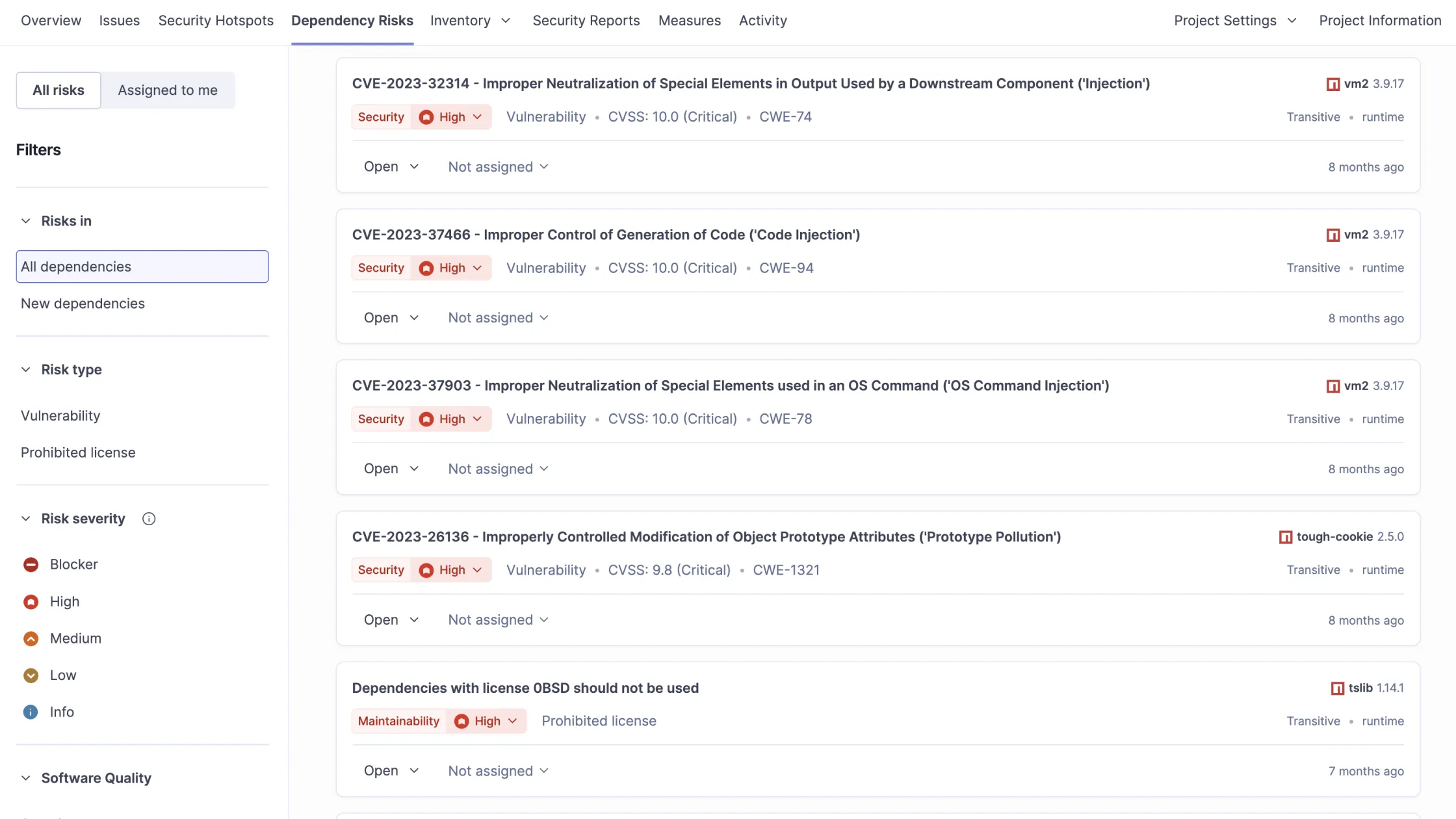
SonarQube delivers powerful Software Composition Analysis (SCA) to scan dependencies for malware and vulnerabilities, blocking threats like the recent PyPI litellm compromise before they infiltrate your dev environment.
This DevSecOps powerhouse integrates seamlessly into CI/CD pipelines, perfect for Python projects vulnerable to supply chain attacks. Here below we also provides examples how to integrate it with GitHub Actions and GitLab CI.
Why Supply Chain Attacks Target DevOps Teams?
Attackers exploit public repositories like PyPI with typosquatting or malicious uploads, as seen in LiteLLM’s .pth backdoor that evaded basic scans.
Direct pulls from these sources bypass traditional security, injecting malware into Docker builds, Kubernetes clusters, or GitHub / GitLab runners.
Why SonarQube Crushes Supply Chain Risks?
Supply chain attacks – think malicious PyPI packages stealing credentials – exploit third-party dependencies.
SonarQube’s Advanced Security scans manifest files like requirements.txt against vulnerability databases and malicious package lists from OpenSSF.
- Flags blocker issues for known malware, failing builds automatically via quality gates.
- Traces data flows with SAST to spot exploit paths in dependencies.
- Generates SBOMs for complete visibility into transitive deps.
In the litellm attack (v1.82.7/1.82.8), SonarQube would’ve detected the credential exfiltration payload during scan, alerting your team instantly.community.
Malware Detection in Dev Environments
SonarQube 2026.1+ explicitly detects malicious packages in PyPI, npm, and more, treating them as critical incidents – not mere vulnerabilities.
Key defenses:
- Real-time CI/CD blocking stops tainted code from merging.
- Maintainer insights via Tidelift reduce noise on false positives.
- Self-hosted Server edition suits air-gapped setups, aligning with enterprise DevOps workflows.
No more rogue dependencies sneaking into production! Quality gates enforce clean pipelines every commit.
Integration Benefits
Embed scans in your CI/CD pipelines for shift-left security, aligning with your DevSecOps focus and air-gapped needs via self-hosted SonarQube Server.
Reduces false positives with exploitability insights and maintainer-verified data from Tidelift integration.
GitHub Actions Integration: Step-by-Step Example
Embed SonarQube in your GitHub Actions for shift-left security on Python repos.
Here’s a battle-tested workflow YAML:
textname: SonarQube Scan
on: [push, pull_request]
jobs:
  sonarqube:
    runs-on: ubuntu-latest
    steps:
    - uses: actions/checkout@v4
      with:
        fetch-depth: 0  # For accurate analysis

    - name: Set up Python
      uses: actions/setup-python@v5
      with:
        python-version: '3.11'

    - name: Install dependencies
      run: |
        python -m pip install --upgrade pip
        pip install -r requirements.txt

    - name: SonarQube Scan
      uses: SonarSource/sonarqube-scan-action@v3
      env:
        SONAR_TOKEN: ${{ secrets.SONAR_TOKEN }}
        SONAR_HOST_URL: ${{ secrets.SONAR_HOST_URL }}

    - name: Quality Gate Check
      run: |
        # Optional: Wait for Quality Gate (Enterprise feature)
        curl -f -u ${{ secrets.SONAR_TOKEN }}: \
          "${{ secrets.SONAR_HOST_URL }}/api/qualitygates/project_status?projectKey=${{ secrets.SONAR_PROJECT_KEY }}"
Setup Tips:
- Generate
SONAR_TOKENin SonarQube > My Account > Security. - Add secrets to GitHub repo:
SONAR_TOKEN,SONAR_HOST_URL(your SonarQube server),SONAR_PROJECT_KEY. - Configure quality gates to block on malicious packages or high-severity SCA issues.
This fails PRs with litellm-like risks, keeping your supply chain secure.
GitLab CI Integration: Step-by-Step Example
Leverage your GitLab expertise with native SonarQube integration for ultimate GitOps security. Add this to .gitlab-ci.yml:
stages:
  - test
  - sonar

variables:
  SONAR_TOKEN: $SONAR_TOKEN
  SONAR_HOST_URL: $SONAR_HOST_URL
  GIT_DEPTH: 0  # Shallow clone for full history

sonar-scan:
  stage: sonar
  image: python:3.11
  script:
    - pip install --upgrade pip
    - pip install -r requirements.txt
    - /usr/bin/sonar-scanner
      -Dsonar.projectKey=my-python-project
      -Dsonar.sources=.
      -Dsonar.python.coverage.reportPaths=coverage.xml  # Optional
  only:
    - main
    - merge_requests
  allow_failure: false  # Fail on quality gate violation
Setup Tips:
- Install SonarQube GitLab plugin or use Docker image.
- Store
SONAR_TOKENandSONAR_HOST_URLas CI/CD variables (Project Settings > CI/CD > Variables). - Enable Merge Request decoration for inline Sonar comments.
- Quality gates auto-block MRs with malicious deps like litellm malware.
This enforces SCA at every pipeline run, ideal for your Kubernetes/GitOps stacks.
Shift-Left Security for DevOps Architects
For GitOps, DevOps or Kubernetes teams, SonarQube Enterprise SCA delivers exploitability ratings and license compliance. Pair with GitHub / GitLab for automated gates that scale across US/EU projects.
Pro Tip: Pin deps (litellm<1.82.7) post-scan, then re-verify. Reduces MTTR from days to minutes.
Key Takeaways for Secure DevOps
SonarQube transforms your development environment into a hardened fortress against supply chain threats, from PyPI malware to OSS vulnerabilities. Ideal for DevOps architects handling US/EU compliance, it scales from self-hosted to cloud without workflow friction.
Do you want to block the next LiteLLM?
Contact us and get a trial and curate your repos today.







