If you use AWS Bedrock for LLM consumption and you have multiple AWS accounts,
LiteLLM can help you build a resilient failover layer so your users do not feel the impact when one account runs out of quota or becomes unavailable.
The idea is simple: LiteLLM sits between your applications and Bedrock, keeps a single stable endpoint for the app, and routes traffic across multiple accounts behind the scenes.
Why this matters
Bedrock is a strong foundation for enterprise AI workloads, but account-level quotas and temporary service issues can still interrupt users. If your application talks directly to one Bedrock account, a quota breach can quickly turn into an outage.
That is exactly where LiteLLM helps. It gives you one consistent API entry point while managing multiple Bedrock backends underneath. Your application keeps calling the same endpoint, while LiteLLM decides which account should handle the request.
How failover works
The failover pattern is straightforward:
- Configure each AWS account as a separate Bedrock backend.
- Send traffic to the preferred account first.
- If that account fails, LiteLLM retries the request.
- If retries do not succeed, LiteLLM falls back to the next account in the chain.
- If needed, it can continue through additional accounts until it finds a healthy path.
Here is an example:
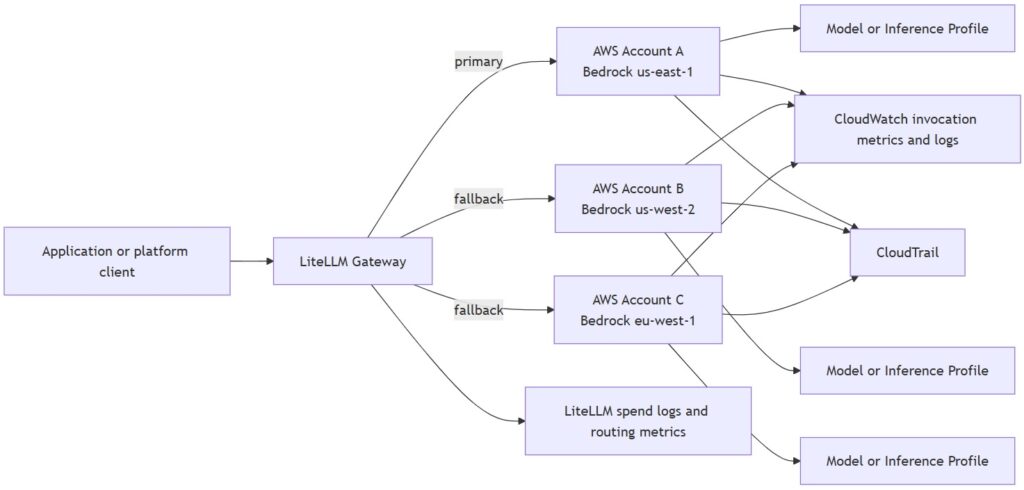
This is especially useful when the issue is not a total outage but a quota exhaustion event. From the application’s point of view, the request either succeeds or fails. LiteLLM adds the routing logic that improves the chance of success.
What LiteLLM gives you
LiteLLM free edition already covers the core pieces needed for Bedrock failover:
- A unified OpenAI-compatible API endpoint.
- Routing across multiple providers or deployments.
- Retries.
- Fallbacks and provider failover.
- Rate limiting and basic cost controls.
- Self-hosting.
That makes it a good fit if your main goal is reliability and controlled overflow across multiple AWS accounts.
Suggested architecture
A practical setup usually looks like this:
- Your applications send all AI requests to LiteLLM.
- LiteLLM contains access to four Bedrock accounts.
- Each account is configured as a separate backend.
- LiteLLM routes requests to the preferred account.
- When the preferred account is unavailable or out of quota, LiteLLM falls back to the next one.
This gives you one logical AI endpoint with multiple physical execution paths. Your users see a stable service, even when one upstream account is exhausted.
FinOps and control
This design also has a FinOps advantage. Once all Bedrock usage flows through LiteLLM, you can start to observe usage by app, team, or environment and decide which account should absorb overflow traffic.
That gives you a better balance between availability and cost control. You can keep premium or preferred accounts for critical traffic while pushing overflow requests to secondary accounts when needed. In practice, that makes AI consumption much easier to manage as a platform service.
When LiteLLM Enterprise becomes relevant
If your requirement is only multi-account failover for Bedrock, you do not need Enterprise at the beginning. The free edition is sufficient for routing, retries, and basic resilience.
Enterprise becomes more relevant when you need features such as:
- SSO and centralized identity
- Support and SLA
- Advanced governance
- Stronger admin controls
- More enterprise-grade observability
- Support for larger organizational rollout
Recommended approach
For your use case, the best path is:
- Install LiteLLM
- Put LiteLLM in front of all Bedrock traffic.
- Configure the four AWS accounts as fallback targets.
- Set sensible retry and cooldown behavior.
- Monitor usage and quota patterns.
- Revisit Enterprise only if you need centralized identity or broader platform controls.
That gives you a low-friction way to improve resilience without adding unnecessary licensing complexity.
FAQ
Q: Can LiteLLM help when one Bedrock account hits daily quota?
Yes. You can configure fallback accounts so LiteLLM can route requests to another AWS account when the first one is unavailable.
Does this work only for outages?
No. It also helps with quota exhaustion, temporary errors, and other availability problems that would otherwise interrupt users.
Is LiteLLM useful for FinOps too?
Yes. Since traffic goes through one gateway, it becomes easier to observe usage, separate traffic by team or environment, and control overflow behavior.
Do I need LiteLLM Enterprise for Bedrock failover?
Not necessarily. For routing, retries, and multi-account failover, the free open-source edition is usually enough.
When should I consider Enterprise?
Consider Enterprise when you need SSO, stronger governance, broader admin controls, or enterprise-scale rollout management.