Socket.dev provides proactive security for open-source dependencies by analyzing package code and behavior to block threats that traditional vulnerability scanners miss.
Understanding Supply Chain Attack Risks
Supply chain attacks target your development dependencies, injecting malware via hijacked packages or malicious updates. Socket.dev analyzes package code in real-time, detecting over 70 red flags like obfuscated code, data exfiltration, and privileged API calls (e.g., filesystem access or eval()).
This blocks threats before they enter your environment, even in minor releases where CVEs fail to catch them.
Supply Chain Attack Prevention
Socket monitors dependency changes in real-time, such as in package.json files, and detects infiltrations like hijacked or compromised packages before they enter your environment. It flags suspicious updates, including sudden additions of privileged APIs (e.g., filesystem access, network calls, child_process, eval()) in minor or patch releases. This prevents attacks targeting the development process itself, where malicious changes bypass CVE-based detection.
Malware Blocking
Socket scans for over 70 red flags across categories like supply chain risk, malware, hidden code, and quality issues in JavaScript, Python, and Go ecosystems. It blocks obfuscated or minified code, dynamic remote code execution, data exfiltration (e.g., sending credentials over HTTP), and telemetry to suspicious domains. Examples include blocking packages like “fiinquant” (obfuscated exec) or “codapt” (remote JS fetch) even while they were live on registries.
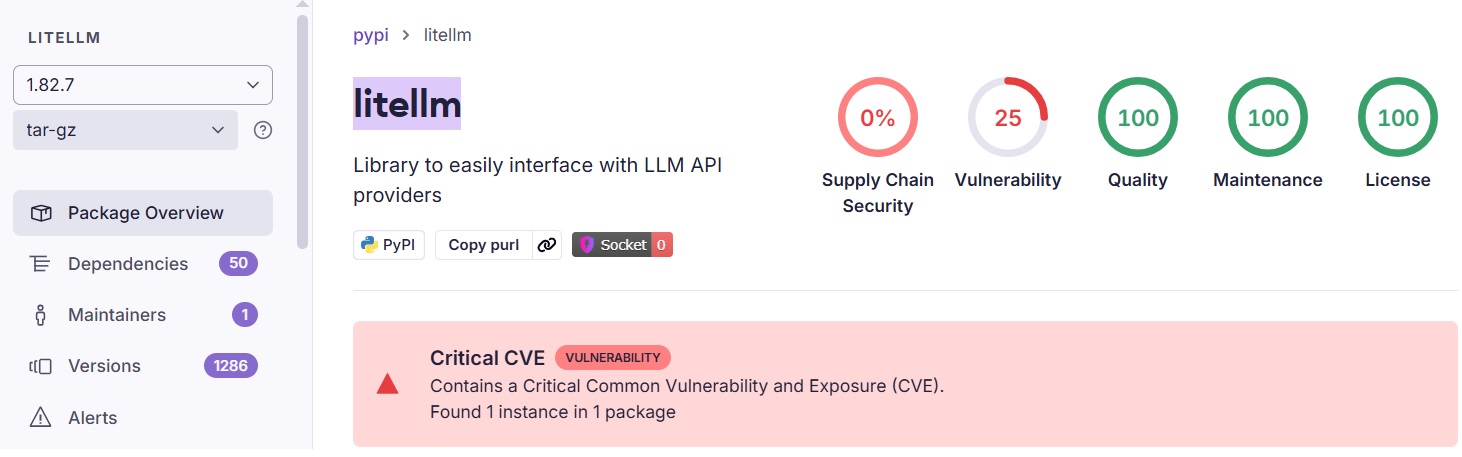
Socket detected the latest Pypi litellm malware (March 2026) – here you can see it preventing an infected version from downloading
Malware Detection Response
Upon detection, Socket generates actionable alerts with details on the threat (e.g., “Backdoor” or “Infostealer”) and blocks the package download via its Firewall proxy if configured – preventing installation entirely.
In CLI mode (socket scan or socket install), it exits with a non-zero code, failing the pipeline step.
Benefits of Integration with CI/CD
Socket.dev integrates with major CI/CD platforms through its CLI and API tokens, enabling security scans in pipelines and blocks merges when integrated with CI tools or via branch protection rules.
Here are a few examples:
1) GitHub Actions Integration
Socket provides native GitHub Actions support via its CLI (socketcli) and dedicated workflows.
It scans dependencies during PRs and CI runs, creating reports or blocking risky changes.
2) GitLab CI Integration
Socket offers direct GitLab CI integration via CLI commands in .gitlab-ci.yml pipelines.
Official docs provide setup steps, including API tokens for scanning manifests and blocking supply chain risks.
It scans dependencies during MRs (Merge Requests) and CI runs, creating reports or blocking risky changes.
3) Jenkins CI Integration
Jenkins integration is available through the Socket CLI.
Use it in Jenkins pipelines (e.g., Jenkinsfile) by installing the CLI/Docker image, setting env vars like SOCKET_CLI_API_TOKEN, and running socket install or socket scan steps.
ALM Tooolbox is the official distributor of Socket solutions, providing assistance with implementing Socket, selecting the right licenses for your needs, integrating with CI tools and applying best practices of DevSecOps and AppSec.
For more details, try Socket or get pricing – contact us:
socket@almtoolbox.com or by phone: 866-503-1471 (USA / Canada) or +31 85 064 4633







