In Jira Cloud, you can create an extended hierarchy using Jira Advanced Roadmaps (previously called Portfolio for Jira), which are available in Premium and Enterprise plans.
This allows you to define custom levels above the standard Epic, Story, and Task hierarchy to represent larger strategic goals.
Usually, the top-level work item type being added is Initiative. An Initiative is a high-level, strategic goal that serves as a container for multiple epics and other work items, providing a broad view of large-scale projects that may span multiple teams or even entire departments.
This results in the following hierarchy:
Initiatives → Epics→ Stories → Tasks→ Subtasks
Often such a structure is implemented by keeping Initiatives and Epics in one “manager” project and delegating Stories, Tasks and Subtasks to multiple “specialist” projects:
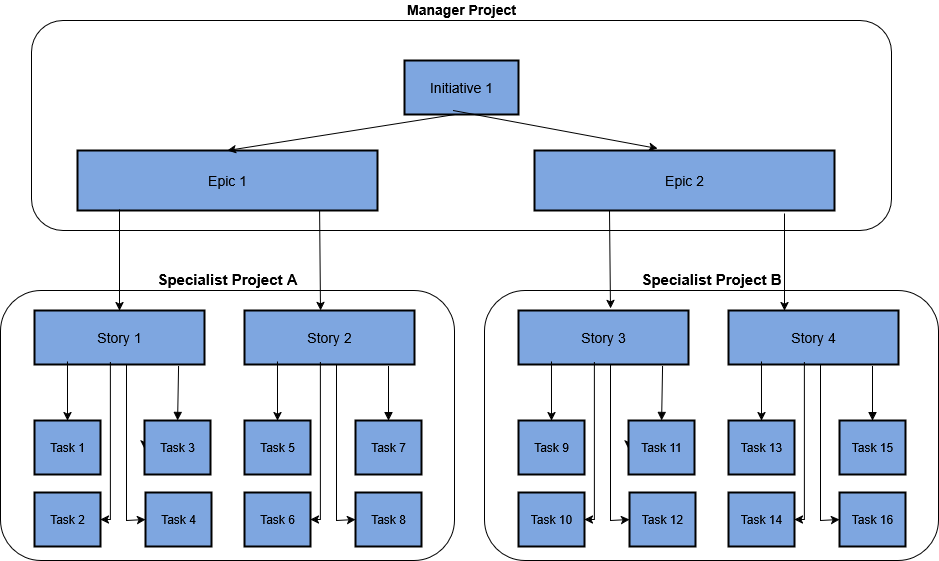
In this way, to have a top-level view, company managers can look only at the manager project, without being bothered by lower-level work items.
For an example, we have built a Jira plan for an imaginary Ministry of Transportation UI development program. Here is a top-level view, showing only the Initiatives:
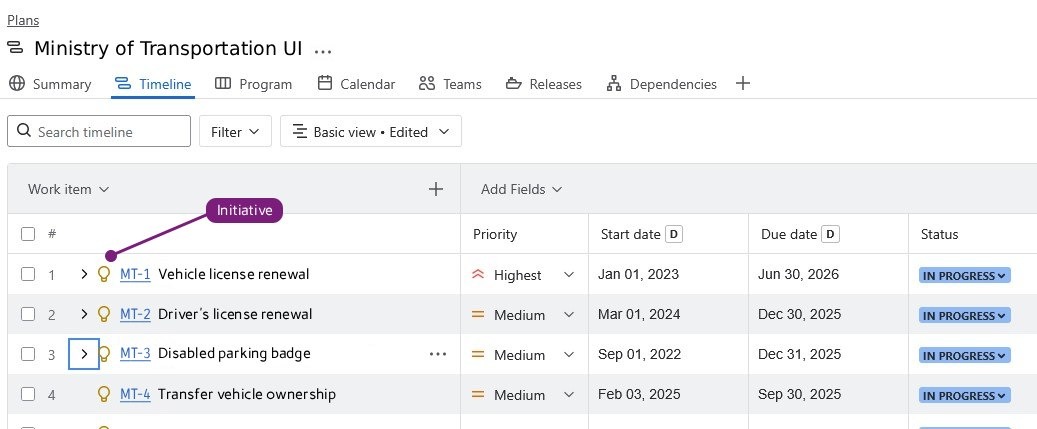
The Problem: Too Much Irrelevant Information
There is no problem viewing the whole structure in a single plan. It will show you all Initiatives and all their child Epics in the manager project , and all child Stories and Tasks (and Subtasks) in all specialist projects.
However, such a plan would be a headache for a specialist project’s manager. With tens of Initiatives, he would see a lot of irrelevant information and will have difficulty drilling down to his project.
Therefore a PM at one of our customers asked us to build a plan, which would include all work items of his project and only those Epics and Initiatives, which are ancestors of his Stories. Here is a diagram showing what items he would like to see:
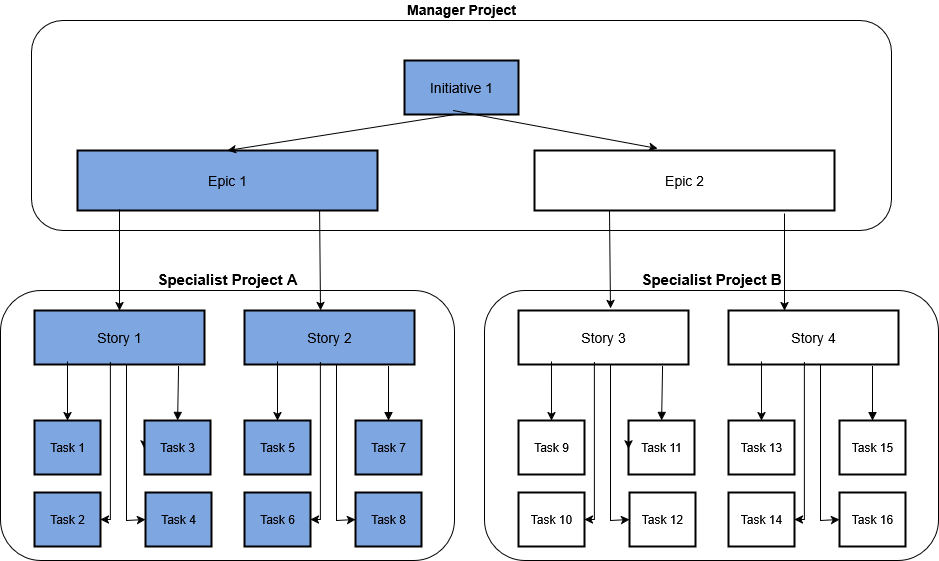
We tried to build such a plan, but it turned out that Jira does not provide an off-the-shelf solution to do so.
Our Solution
To solve this problem, we have written a Python program, which uses the Jira Cloud API and builds and/or updates such a plan. Since we expect all project managers to wish for plans, which would contain only relevant data, our program builds a separate plan for each specialist project.
Here is a plan of the VL project, which works on the “MT-1 Vehicle license renewal” initiative. We see an Epic (MT-16), Stories (VL-1 and VL-2) and Tasks (VL-8 and VL-17).Note that the Initiative and the Epic are in the “Manager” MT project, while the Stories and the Tasks are in the “Specialist” VL project.

Thus the VL project’s manager can see his own work items and only relevant MT project’s work items.
Continuous Updates
We have uploaded that program to the company’s GitLab and created a CI pipeline, which runs every night and updates plans in all projects.
Now every morning when a project manager comes to work, he needs only to refresh the screen to see the updated plan of his project.
Do you have a similar problem? We can help you too.
We can help you analyze the problem, plan and implement a Jira resolution that 100% fits your needs. Contact us: jira@almtoolbox.com or call us:
866-503-1471 (USA & Canada) / +31 85 064 4633 / +972-772-405-222
Alex Karnovsky (B.A. in Maths, D.Sc. in Operations Research) is an experienced Jira specialist and a certified GitLab one. He has an extended expertise in the ALM / DevOps / SDLC methodologies and
tools (Jira, git, GitLab, GitHub, Jenkins, ClearQuest, ClearCase, BitBucket and more).







